I use both an iPhone and a Mac, but I also have a Windows PC on the go, and that means there are times when my apps don't translate across both platforms, and many work on one device but not the other. It's a perennial problem for people like me, but it rears its head in many ways.
That was particularly problematic when it came to my schedule. I like to use Apple's Calendar app on my iPhone, but there isn't a Windows version. That meant I would have to edit my schedule entirely on my iPhone, even when I was sitting in front of my PC, which was a complicated task without an easy way to drag and drop items and entries. Or I would have to sign in to iCloud on my PC, which was cumbersome.
Finally, I decided enough was enough and started looking for a cross-platform calendar app that would work on my iPhone, Mac, and PC. I found it in the form of Fantastical, which happens to be one of the best calendar apps on the market. It's an app that's long been an Apple stalwart, but it recently released a PC version, making it ideal for cross-platform users like me (although there's no Android version yet).
Since I started using Fantastical, I've found that it solved almost every problem I had when juggling a calendar on multiple devices. Here's why you might want to try it too.
A rich set of features
First things first, Fantastical is a great option for people who use several different devices and platforms. As long as you have a Fantastical account, your calendars sync across all the devices you're signed in on, so changes made on one device propagate to all the others. That means I no longer have to rely solely on my iPhone: I can adjust my schedule wherever I am.
Fantastical also syncs with iCloud, so it updates Apple's Calendar app on my iPhone (and vice versa), which is handy if I want to use the Apple app for any reason.
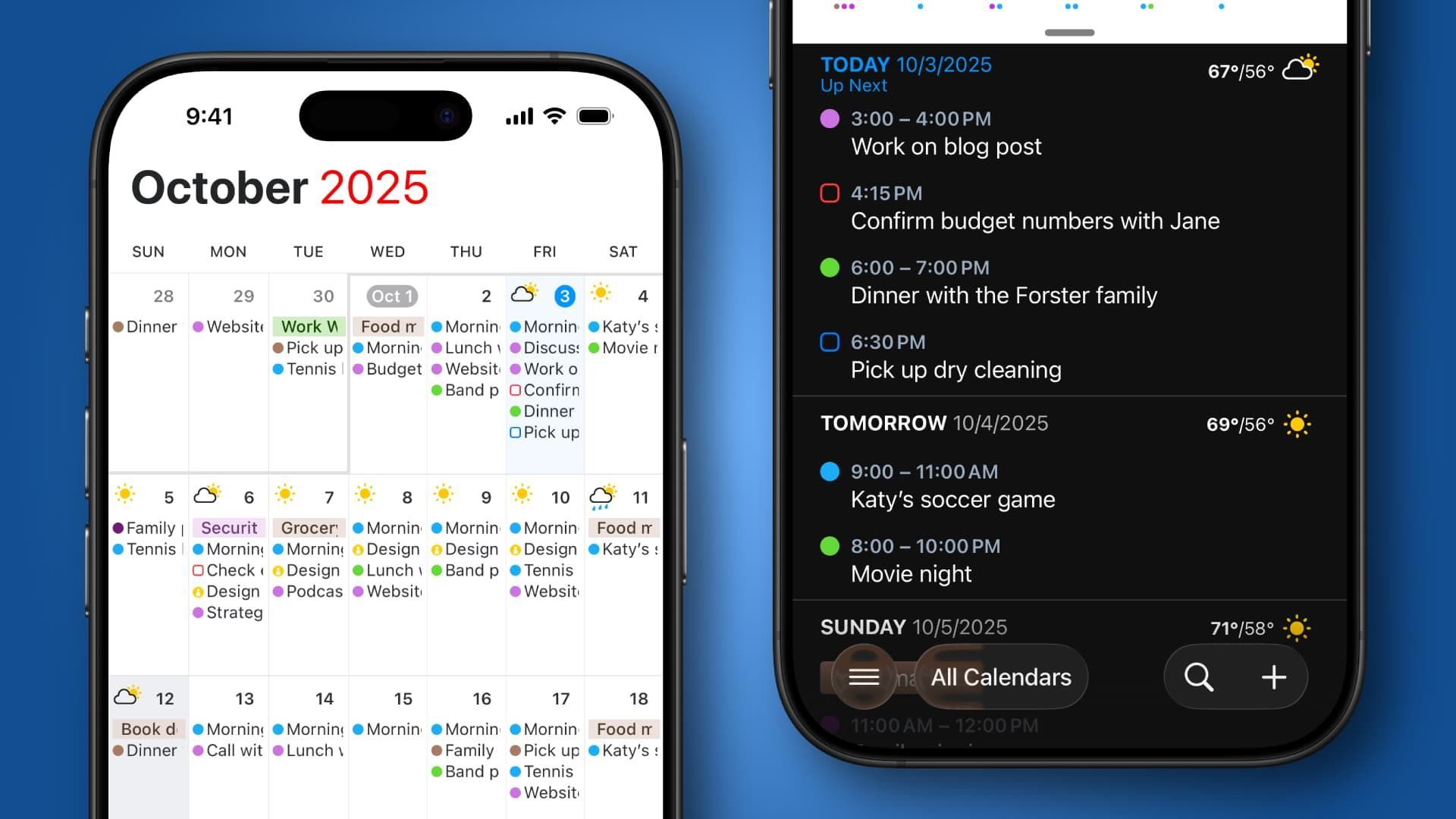
But I don't love Fantastical just for its cross-platform support. No, it has many other features that are worthy of recommendation. One is its clean and clear design on any device. It's easy to display the full calendar or display it at half size with the week view shown in more detail, for example; All you have to do is swipe up or down. That gives it a very intuitive design on both Mac and PC.
Plus, its ability to drag and drop events to the desktop makes it easy to update your calendars. You can combine all your calendars into a single view, meaning you'll no longer miss work events or social engagements because one calendar is stored in a different app. And displays reminders and calendar events, giving a complete view of your agenda and upcoming tasks. It even shows the weather for the next 10 days, helping you plan ahead.

Aside from all that, there are also a ton of quality of life features that make my life easier in small ways that add up. One of them is Fantastical's inclusion of natural language event input. For example, I can create an event with the text “Lunch with Sam tomorrow at 3pm for two hours at The White Horse, Wembley” and all those details will be added to a new event. It's fast, simple and easy to master.
To make things even easier, you can forward emails related to an event, such as a table reservation, to a dedicated Fantastical email address and the event will be automatically analyzed and added to your calendar. This is a useful trick if you're ever in a hurry and don't have time to add your events manually.
And uploaded attachments are synced across devices, while frequent events and tasks can be converted into templates for later use.
It's also great for scheduling meetings. For example, you can use the Vacancies feature to show other people when you are available and allow them to reserve a space from a variety of options. Or the app lets you invite people to events with an RSVP system and can automatically add a conference call with a variety of apps (including Zoom, Webex, Microsoft Teams, and more) when people schedule a meeting using Openings.
With such a rich range of features, I found that it has much more to offer than basic cross-platform support.
just what i need

There are a lot of things to like about Fantastical and it has largely solved my cross-platform programming problems, but I'm not going to sit here and pretend it's 100% perfect. Since using it, I've found that repeating calendar events (those that repeat every week, in my case) sometimes generates errors claiming that the version in the app is different from the one on the server, even though I didn't alter the event in any way.
And for all its intelligence, Fantastical's natural language input can sometimes be a little iffy and I may not understand exactly what I'm asking.
I'm also not a fan of the app's tendency to display all overdue tasks (regardless of their age) at the top of each day's events list, which can crowd out more relevant items on your schedule.
But even taken together, those issues aren't significant enough to discourage me from using Fantastical. Compared to what I had before, where I was faced with managing my calendar management solely through my iPhone or managing things across multiple apps, Fantastical is miles ahead.
I pay $5 a month for Fantastical's premium subscription, which gives me unlimited calendar sets, the full 10-day weather forecast, departure time notifications, the Openings feature, and more. There is also a free edition that can be used indefinitely, although with a more limited feature set. Considering how much Fantastical has helped me organize my schedule across all my devices, I think it's worth the price.
Ultimately, it has given me the calendar experience I have been needing for years. I just wish it hadn't taken me so long to try.
Follow TechRadar on Google News and add us as a preferred source to receive news, reviews and opinions from our experts in your feeds. Be sure to click the Follow button!
And of course you can also follow TechRadar on TikTok for news, reviews, unboxings in video form and receive regular updates from us on WhatsApp also.