- Corsair adds Frame 4000D LCD RS ARGB to its line of PC cases
- It has a 14.5-inch Xeneon Edge touchscreen.
- Starting price of $399.99
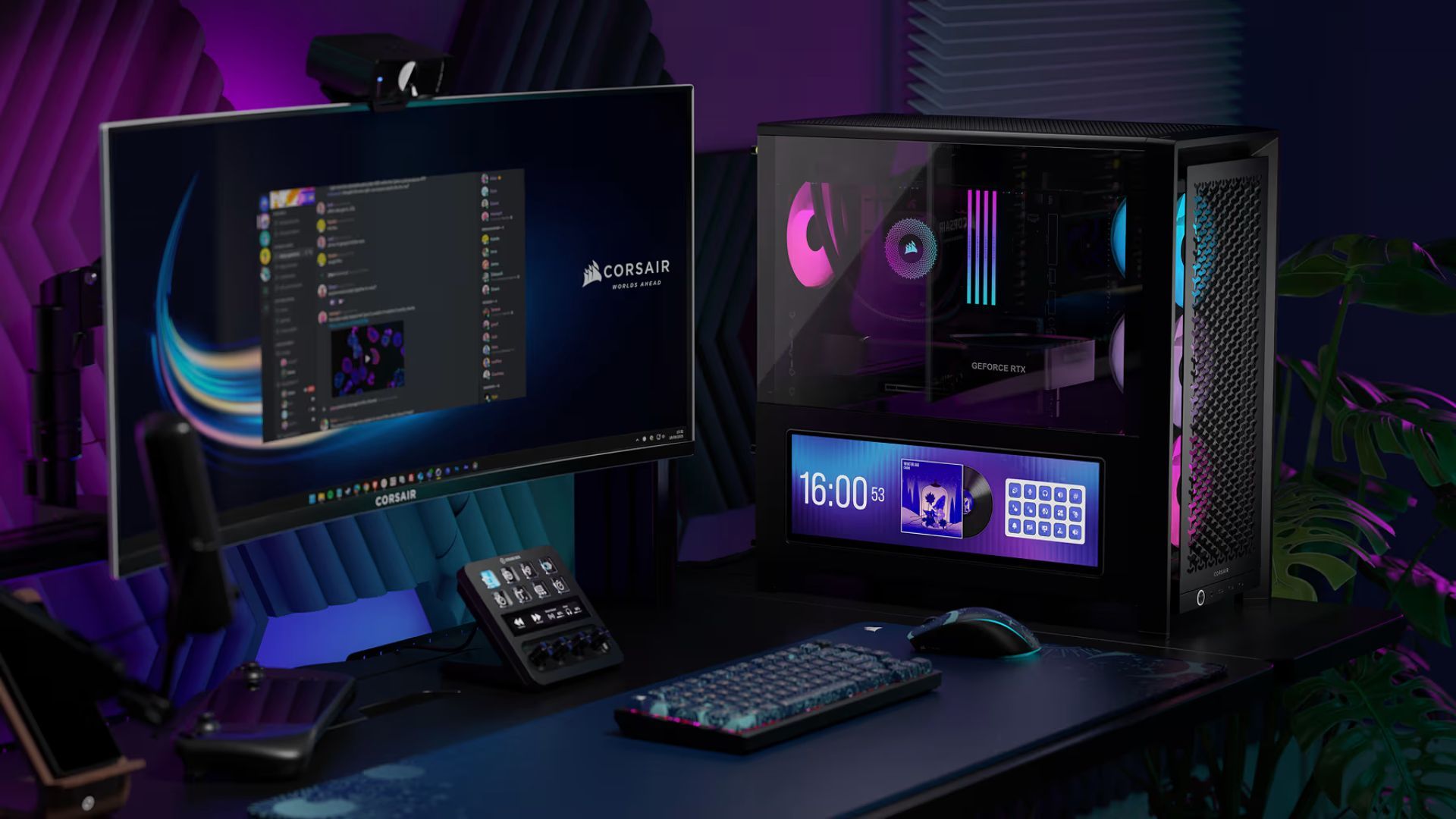
Corsair recently launched a new entrant to its Frame series of PC cases: the Frame 4000D LCD RS ARGB. As the name suggests, this model comes equipped with a 14.5-inch LCD screen on the left side of the case.
In theory, that's perfect for monitoring metrics like GPU temperature, checking the date and time at a glance, and adding useful widgets at your fingertips.
But in practice, I don't see why you would spend $400 on this case when you could get the original Frame 4000D for $114.99 and have over $200 left over to buy another monitor.
4000D LCD RS ARGB Frame: A Closer Look
Let's take a closer look at Corsair's new Frame 4000D LCD RS ARGB. If you can ignore the exorbitant asking price, it appears to be a great mid-tower case.
Its dimensions of 490 x 486 x 239 mm (19.29 x 19.13 x 9.41 inches) are unchanged from the original Frame 4000D, providing support for Mini-ITX, Micro-ATX, ATX and E-ATX builds while also offering plenty of interior space for future expansion.
If you like to keep an eye on your components, you can use the tempered glass side panel to take a look at your computer's sleek parts, and the steel mesh front panel (also included on other Frame cases) is great for letting in plenty of airflow and giving the case a premium overall feel.
Speaking of airflow, the Frame 4000D LCD RS ARGB also has room for up to 13 fans. For me, one of the most interesting features of this case is Corsair's InfiniRail mounting system, which supports 120, 140, and 200mm fans with the flip of a switch. If you use an AIO liquid CPU cooler, you can mount it on the front, side, or top and install additional fans as needed.
It also comes in black and white colorways and features an updated front I/O layout, complete with a power button, 3.5mm headphone jack, 2 USB-C Gen 1 ports, and 1 USB-C Gen 2×2 port.
And the quality of life features don't end there. If you use one of today's large, heavy, and bulky graphics cards, you'll appreciate an anti-sag stabilizer to keep the most expensive part of your build safe. There is also a cable cover to keep unsightly cable cobwebs hidden.
But all of that takes a backseat to the real reason Corsair released this case: the 14.5-inch Xeneon Edge LCD touchscreen. This is the star of the show. It has a resolution of 2560 x 720 and a refresh rate of 60 Hz, and can be installed vertically or horizontally.
It has 5-point touch capability and can be customized on the Corsair iCUE to display all kinds of apps, widgets, and PC metrics, or just some pretty illustrations to add a custom look to your setup.
The standalone display can be mounted in a number of different ways, although the Frame 4000D LCD RS ARGB all-in-one package always sees it attached to the case horizontally below the tempered glass side panel.
The Frame 4000D doesn't need tricks

Let me start by saying that I love Corsair PC cases. I use the 4000D Airflow for my personal PC gaming rig and it's fantastic. But I just don't understand why Corsair went this direction.
I've gone on record as saying that I hate when manufacturers add screens to products for the purpose of display (check out my article on these 5 Terrible Keyboard Trends That Should Stay in 2024). Yes, it has some functions. But I don't see enough benefit to justify the huge increase in price.
Why would you pay $400 for a PC case with a small 60Hz display when you could get a great case for around $100 and use the rest to get a 144Hz+ monitor that does everything the Xeneon Edge does?
No, that external monitor would not be touch-sensitive. But how often will you use that touch screen? The gimmick will lose its shine after a few weeks, if not sooner, and you'll wish you'd chosen something more practical. Especially with RAM prices skyrocketing to the levels they are at now.
You could even get a Frame 4000D case, a 144Hz monitor, and an Elgato Stream Deck MK.2 for a little less than the price of the Frame 4000D LCD RS ARGB alone.
If this case is crying out for all of its fantastic benefits and you don't mind the price, then add it to your collection. But if you're not sure what you'd use that touchscreen for, there's absolutely no reason to buy it over Corsair's other tried-and-true PC cases.

The best PC cases for every budget
Follow TechRadar on Google News and add us as a preferred source to receive news, reviews and opinions from our experts in your feeds. Be sure to click the Follow button!
And of course you can also follow TechRadar on TikTok for news, reviews, unboxings in video form and receive regular updates from us on WhatsApp also.